
Before you begin
- Your access to the Clients dashboard depends on your user role
- Some actions (e.g. adding or archiving clients) are limited to Organization Administrators
Overview
The Clients tab, located in the left-hand sidebar, provides a dedicated dashboard to manage and view all clients within your organization.
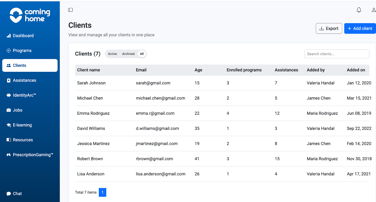
From this dashboard, you can:
- View all Active clients (currently receiving services)

- View all Archived clients (no longer active)

- Access a complete list of clients in the system (both active and archived clients)

- Add new clients (Organization Administrators only)
- Export client data
What you can do in the Clients dashboard
View clients
- Switch between Active and Archived client lists
- View all clients based on your role permissions
Manage clients
- Add new clients (Organization Administrators only)
- Access and open client profiles
- Export client information
Client access by role
Access to client data is controlled by user roles to ensure data security and appropriate permissions.
1. Organization Administrator: Full access to client management within their organization.
This role can:
- View all clients
- View and edit client profiles
- Add new clients
- Assign clients
- Archive and unarchive clients
Cannot:
- Access clients outside their organization
2. Team Member: Access limited to assigned clients.
This role can:
- View assigned clients
- View and edit client profiles
Cannot:
- Add or assign clients
- Archive or unarchive clients
- View all clients unless assigned
3. Intern / Volunteer: Limited visibility and interaction.
This role can:
- View assigned clients
- View client profiles
Cannot:
- Add clients
- Assign clients
- Edit client information
- Archive or unarchive clients
4. Law Enforcement / Advocate: Restricted, external access for collaboration.
This role can:
- View assigned clients
- View client profiles
Cannot:
- Add, assign, or edit clients
- Archive or unarchive clients
Result
The Clients dashboard provides a centralized view of all clients, enabling teams to manage access, track activity, and maintain organized client records.
Tips / Best Practices
- Use Active vs Archived filters to quickly find relevant clients
- Ensure clients are correctly assigned to the appropriate team members
- Regularly review archived clients to maintain accurate records
- Follow role-based permissions to protect client data
Related Articles
Need more help?
If you cannot update a field, contact the Coming Home Support Team for additional help.