
What this feature does
Assistances allow organizations to record and manage services, support activities, or resources provided by staff. These services can be linked to a specific client, associated with a program, or recorded at the organization level, offering flexibility in how service delivery is documented.
In addition to documenting services, Assistances enable users to capture measurable outcomes such as time spent, financial amounts, quantities, or other quantitative metrics. This ensures that organizations can record both the qualitative context and the measurable impact of the support delivered, supporting evaluation, coordination, and compliance requirements.
Why Assistances matter
Consistent service tracking is essential for both operational effectiveness and reporting. Assistances help organizations:
- Maintain a centralized and complete record of services delivered
- Understand how support is provided across clients and programs
- Capture both qualitative context and measurable outcomes
- Support reporting requirements such as VOCA and HMIS
- Improve coordination and visibility across teams
- Enable evaluation and outcome measurement
Without Assistances, service delivery can become fragmented and difficult to measure.
Who can use this feature
- Organization Administrators
Full access to create, duplicate, view, edit, archive, and unarchive assistance records. - Team Members
Can add, duplicate, and view assistances, and edit records they own. - Interns / Volunteers
Can add, duplicate, and view assistances, and edit records they own. - Law Enforcement / Advocates
Can add, duplicate, and view assistances, and edit records they own.
Where Assistances can be recorded
Assistances can be tracked at multiple levels depending on how services are delivered:
1. Organization-Level Assistances
- Used for services not tied to a specific client or program.
- Examples include outreach activities, general services, or operational support.
2. Program-Level Assistances
Assistances can be recorded within programs in two ways:
- Linked to a Client
Records services delivered to a specific individual within a program, supporting case tracking and service history. - Unlinked (Program-Level Only)
Records services delivered under a program that are not tied to a specific client, such as workshops or group sessions.
3. Client-Level Assistances
- Tracks services directly associated with an individual client.
- Provides a clear timeline of support and supports coordinated care and detailed reporting.
4. Client + Program (Enrolled Program Level)
- Tracks services delivered to a specific client within a specific program enrollment.
- Helps measure program outcomes and distinguish program-specific services from general support.
Key capabilities
With Assistances, users can:
- Add new assistance records
- Categorize services by category and subcategory
- Record service dates
- Link assistances to clients and/or programs
- Identify who provided or recorded the service
- Capture quantitative metrics such as duration, percentages, counts, or financial amounts
- Search and filter assistance records
- Export assistance data for reporting and compliance
- Archive or unarchive records to maintain accurate histories
What information can be tracked
Each assistance record can include:
- Service category and type
- Client (if applicable)
- Program or program enrollment (if applicable)
- Provided by (staff member or organization)
- Date of service
- Financial amount (USD)
- Quantitative metrics (e.g., duration or quantity)
- Status (Active or Archived)
This comprehensive data structure allows organizations to capture both what was delivered and its measurable impact
How Assistances are organized
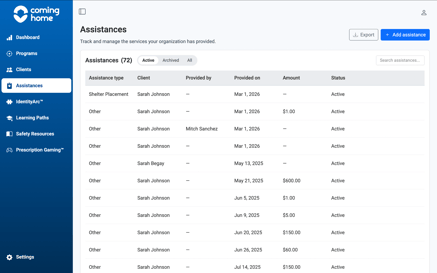
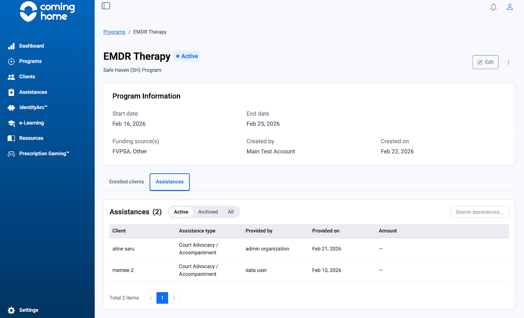
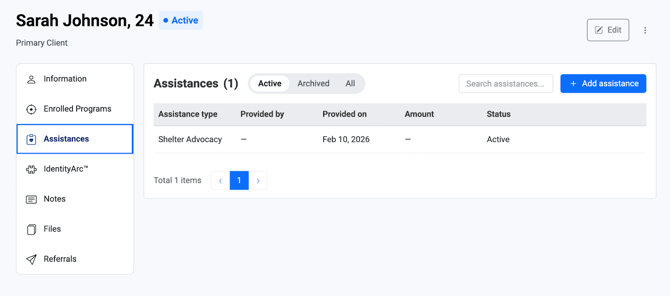
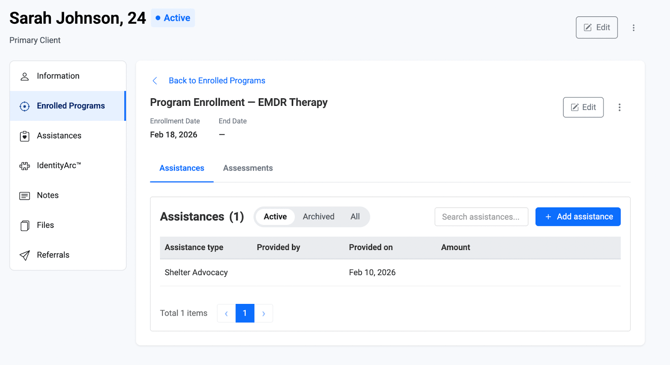
Assistances are visualized through four contextual dashboards, each offering a different perspective on service delivery:
Organization-Level Dashboard
Provides a centralized view of all assistance records across the organization.
Use this to:
- Monitor overall activity
- Track service delivery across teams
- Maintain organizational oversight
Program-Level Dashboard
Displays assistance records associated with a specific program.
Use this to:
- Track services delivered within a program
- Monitor program activity and engagement
- Support program reporting and accountability
Client-Level Dashboard
Shows all assistance records linked to an individual client.
Use this to:
- Maintain a clear timeline of support
- Coordinate care across team members
- Support case management and outcome tracking
Client + Program (Enrolled Program) Dashboard
Displays assistance records for a specific client within a specific program enrollment.
Use this to:
- Track program-specific support
- Evaluate outcomes tied to participation
- Separate program-related services from general client services
Example use cases
Assistances can be used to document a wide range of services, including:
- Advocacy or accompaniment
- Emergency financial assistance
- Outreach services
- Volunteer work
- Counseling or therapy sessions
- Group sessions
- Transportation support (e.g., gas vouchers or bus passes)
- Safety planning or crisis response activities
Summary
Assistances are the foundation of service tracking within the platform. They enable organizations to document every service delivered, track client and program activity, support reporting and compliance, and maintain a clear, structured record of their work.
Related Articles
- How to Create a New Assistance
- How to assign an assistance at the organization level
- How to assign an assistance at the program level
- How to assign an assistance at the client level
- How to manage linked vs unlinked assistances
Need more help?
If you need assistance using the Assistances feature or have questions about best practices, please contact your Organization Administrator or reach out to our Support Team for further guidance.