
What is This Connection?
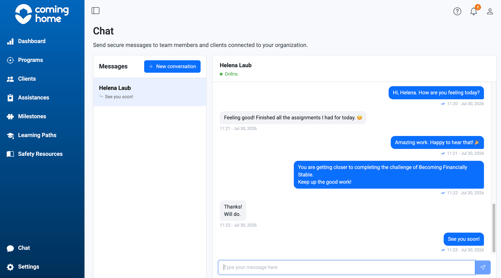
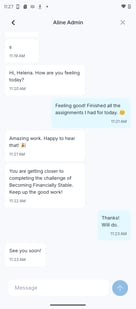
Messages sent between a client and their care provider flow in both directions: from the mobile app to the CCMS, and back again. This article shows exactly how that works.
Who This Applies To
- Care Providers and Team Members
- Receive client messages and a notification in the web platform
- Reply from the Client Toolkit
- Clients
- Send messages from the app
- See provider replies appear directly in the app
How the Connection Works
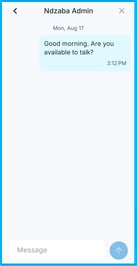
- Your client sends a message from the Chat section of the mobile app.
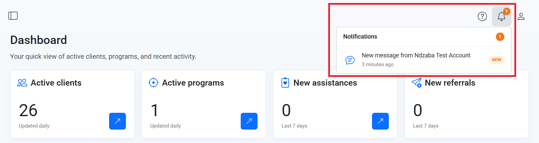
- You receive the message in the Client Toolkit, along with a notification.
- You reply from the web platform.
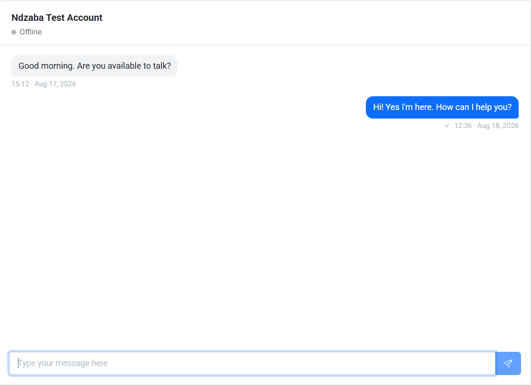
- Your reply appears in your client's app, continuing the same conversation thread.
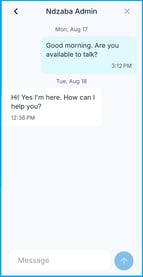
Why it matters: Understanding this flow helps you know what your client sees and when, so you can set clear expectations about response time and availability.
Tips/Best Practices
- Reply from the same conversation thread: This keeps the full message history connected for both you and your client.
- Use notifications to catch new messages quickly: Especially useful if you manage multiple clients.
Related Articles
- Overview of App and System Connectivity
- Messaging a Client from the CCMS
- Messaging Your Care Provider in the App
- Notifications: Staying Informed on Client Activity
Need more help?
If a message isn't syncing correctly:
- Confirm your client's app access and credentials are active
- Contact the Coming Home support team for technical assistance