
What are Notifications?
The Coming Home web platform includes a notification system that helps care providers stay aware of important client activity, without needing to constantly check each client profile manually.
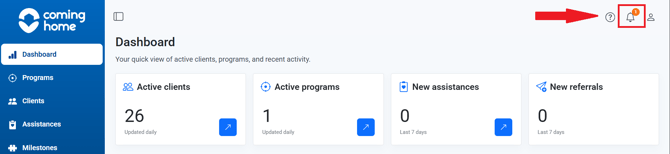
Who Receives Notifications
- Organization Administrators and Team Members - Receive notifications for clients assigned to them
- Clients - Do not receive CCMS notifications; the app does not currently include provider activity notifications for clients
What Triggers a Notification
Care providers can be notified when:
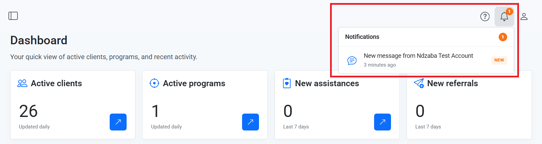
- A client sends a new message from the mobile app
- A client completes an assignment from the mobile app
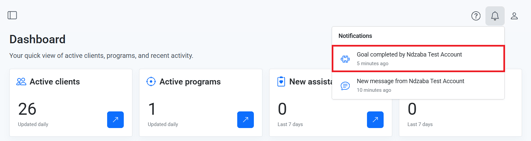
Why it matters: Notifications help providers respond quickly to client activity, supporting continuity of care even when a provider isn't actively reviewing a client's profile.
Tips/Best Practices
- Check notifications daily: This helps you catch new messages or completed assignments in a timely way.
- Don't rely on notifications alone for urgent situations: Continue to follow your organization's protocols for time-sensitive client needs.
Related Articles
- Overview of App and System Connectivity
- Messaging a Client from the CCMS
- Team Chat: Messaging Colleagues Within Your Organization
- How Client Messages Sync Between the App and CCMS
- How Assignment Completion Triggers Provider Notifications
Need more help?
If you have questions about notifications:
- Reach out to your Organization Administrator for guidance on permissions and workflows
- Contact the Coming Home support team for technical assistance